Renode Notes
Page Contents
References
Cheat
Starting renode:
renode [--disable-gui] --console <path to .resc file>
Simple .resc:
Clear

using sysbus
mach create "stm32u5-osmium"

machine LoadPlatformDescription $ORIGIN/stm32u5.repl

# Load the application before exposing the CPU to GDB. This initializes the
# Cortex-M reset vectors without starting the emulation.
sysbus LoadELF $ORIGIN/../out/build/Debug/src/test-crash-dump-u5

# GDB starts the already loaded application with `monitor start`.
machine StartGdbServer 3333 false
Then start GDB:
/opt/gcc-arm-none-eabi/bin/arm-none-eabi-gdb <path to ELF>
Then in GDB:
set pagination off
target remote localhost:3333
break main
monitor start
continue
To see a serial do:
showAnalyzer sysbus.uart2
REPL Files
EXTI
Taken from the stmh743.repl file one can see the following:
exti: IRQControllers.STM32H7_EXTI @ sysbus 0x58000000
    [0-4] -> nvic@[6-10]
    [5-9] -> nvicInput23@[0-4]
    [10-15] -> nvicInput40@[0-5]
    [16-19] -> nvic@[1, 41, 2, 3]
    [20, 21] -> nvicInput137@[0-1]
    [22-24] -> nvic@[31, 33, 72]
    ...
It has the format [exti event number] -> nvic@[nvic position].
From RM0433 Rev 8, under section "19.1.2 Interrupt and exception vectors" we get:
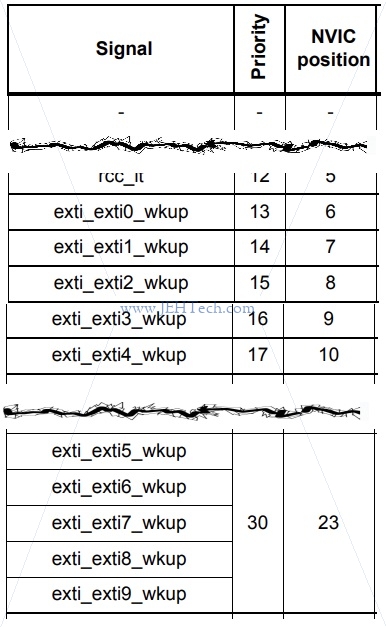
So we can see that EXTI 0 to 4, shown by exti_exti0_wkup through exti_exti4_wkup above map to NVIC positions 6 through 10, hence the line [0-4] -> nvic@[6-10]. This says map EXTI source 0 to NVIC position 6,
EXTI source 1 to NVIC position 7 and so on.
EXTI 5 to 9, is found a little further down in the table. All of these EXTI GPIO pins map to the same NVIC position, 23. That is why we see [5-9] -> nvicInput23@[0-4]. This says map EXTI sources 5 through nine to the same NVIC INPUT, number 23, and I guess give them a sub index of sorts under this position.
Once we have done the 16 GPIO EXIT sources things become a little harder. What, for example, are EXTI sources 16 through 19. To figure this out, we have to go over to table "Table 143. EXTI Event input mapping" in section "20.4 EXTI event input mapping":
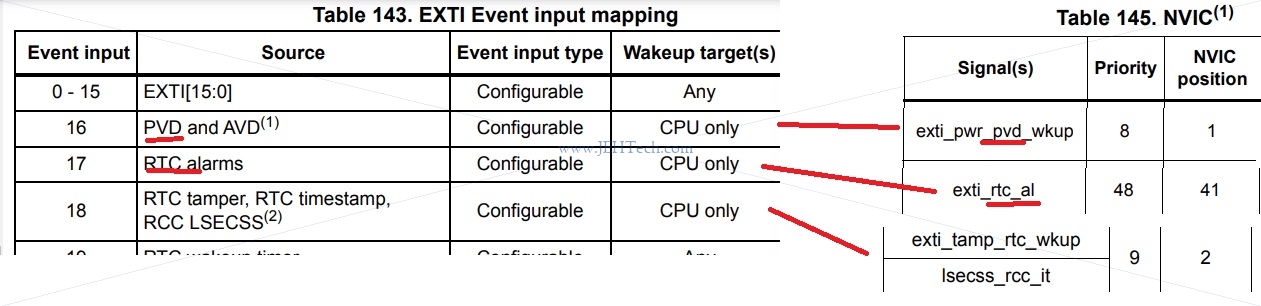
This is a bit more work but we can see were the mapping is coming from. We can see that in [16-19] -> nvic@[1, 41, 2, 3] the event inputs are 16-19, and by looking each one up individually we can find the NVIC position they map to. This particular line says that EXTI event 16 maps to NVIC position 1, 17 to 41, and so on.
For the NVIC positions that have multiple things mapped into them, like [5-9] -> nvicInput23@[0-4], the following is also seen below the EXTI source to NVIC position map in the REPL file:
nvicInput23: Miscellaneous.CombinedInput @ none
    numberOfInputs: 5
    -> nvic@23
So that is how the EXTI map is created.